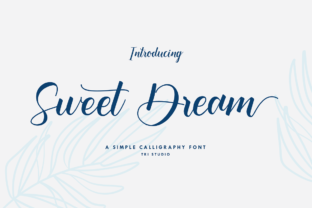
Sweet Dream: A Modern Script Font for Web Design
I was halfway through a landing page redesign for a boutique floral studio when I realized the hero section felt flat. The imagery was lush and organic, but the typography was too rigid, creating a disconnect between the visual emotion and the user experience. I needed a typeface that could bridge that gap—something that felt handcrafted yet maintained the precision required for digital interfaces. That is when I pulled Sweet Dream into the project. As part of the Script Amp collection, this font promises to update classic calligraphy with a modern twist, and after testing it across several responsive layouts, I can confirm it delivers a unique flavor that elevates digital brand identity without sacrificing usability.
Visual Personality and Digital Appeal
Sweet Dream is not just another script font; it is a carefully balanced display font that merges the fluidity of traditional handwriting with the clean lines of modern typography. When you first load it into your design tool or CSS stack, the immediate impression is one of approachable elegance. The strokes are smooth, avoiding the jagged edges that sometimes plague lower-quality web fonts, which gives it a premium feel right out of the box.
The mood of this typeface is warm, inviting, and slightly whimsical. It works exceptionally well for brands that want to convey authenticity and personal touch. In my testing, I found that Sweet Dream shines in editorial design contexts on the web, such as blog headers or featured quotes, where it acts as a visual anchor. It does not scream for attention like a bold sans serif might; instead, it whispers sophistication. This makes it an ideal choice for creative professionals, coaches, and online store owners who want their digital presence to feel curated and thoughtful rather than corporate and cold.
Strategic Placement in Web Layouts
One of the most critical decisions in web design is knowing where a decorative font belongs. Sweet Dream is a display font, meaning it is designed to be seen at larger sizes. I tested it extensively in hero sections, and the results were striking. When used for main headlines, it creates an immediate emotional connection with the visitor. However, its performance changes drastically depending on the context.
- Hero Sections: Perfect for short, impactful headlines. The flowing ligatures add movement to static images.
- Call-to-Action Buttons: Use with caution. While it looks beautiful, ensure the text remains legible against various background colors.
- Testimonials: Excellent for quoting customer reviews, adding a human voice to social proof.
- Logo Design: Strong potential for wordmarks in lifestyle, beauty, or creative industries.
I would strongly advise against using Sweet Dream for body copy, navigation menus, or form labels. Its decorative nature reduces readability at small sizes, which can frustrate users and hurt accessibility. For those elements, stick to a clean sans serif font or a simple serif font to maintain a clear visual hierarchy. The goal is to let Sweet Dream be the star of the show, not the workhorse of the interface.
Readability and Responsive Considerations
In the era of mobile-first design, testing how a script font renders on smaller screens is non-negotiable. I previewed Sweet Dream on various devices, from large desktop monitors to compact smartphones. On larger screens, the intricate details of the calligraphy are delightful. On mobile, however, some of the finer swashes can blur if the font size is too small or if the contrast is low.
To mitigate this, I adjusted the line height and letter spacing in the CSS. Giving the letters a bit more breathing room prevented the ligatures from overlapping awkwardly on narrow viewports. When placing Sweet Dream over image banners, I found that adding a subtle text shadow or a semi-transparent overlay significantly improved legibility. Dark backgrounds with light text worked better than light text on busy patterns, ensuring the modern typography remained crisp and distinct.
For UI designers, this means you must be intentional about scale. Do not try to squeeze long phrases into tight spaces. Keep headlines concise. If you need to convey detailed information, pair Sweet Dream with a highly readable secondary font. This contrast not only aids scanning behavior but also enhances the overall aesthetic balance of the page.
Font Pairing for Brand Consistency
A great font never stands alone; it interacts with the rest of your design assets. Finding the right font pairing for Sweet Dream was surprisingly intuitive. Because it has a soft, rounded character, it pairs beautifully with geometric sans serif fonts. The stark simplicity of a modern sans serif grounds the whimsy of the script, creating a professional yet friendly brand identity.
I also experimented with pairing it with a classic serif font for a more editorial look. This combination worked well for a coaching website where the client wanted to project authority mixed with warmth. The serif provided structure, while Sweet Dream added the personal touch. Avoid pairing it with other handwritten fonts, as this can create visual clutter and confuse the user’s eye. Stick to one decorative element per section to maintain clarity and focus.
Technical Implementation and Licensing
Before launching any site with a new typeface, check the technical specifications. Sweet Dream comes in standard file formats suitable for web embedding. Ensure you have the correct commercial font licensing if you are building sites for clients or selling digital templates. Using a font without proper clearance can lead to legal issues down the line. Additionally, check for multilingual support if your audience is global. While many modern fonts cover basic Latin characters, verifying extended character sets ensures your design remains inclusive and functional for all users.
Also, consider loading performance. Script fonts can sometimes be heavier in file size. Use font-display strategies in your CSS to prevent flash of unstyled text (FOUT), ensuring that the user sees a fallback font until Sweet Dream loads completely. This small technical tweak preserves the seamless experience users expect from high-quality web design.
Elevating Digital Experiences
Ultimately, typography is about more than just reading words; it is about feeling the brand. Sweet Dream offers a way to inject personality into digital spaces that often feel sterile. Whether you are designing a portfolio homepage, a product landing page, or a course sales page, this font adds a layer of craftsmanship that resonates with users. It signals that care went into the design, which builds trust and engagement.
By using Sweet Dream strategically in headers and accent areas, while supporting it with clean, functional body text, you create a balanced and engaging user interface. It is a versatile tool in the web designer’s toolkit, capable of transforming a standard layout into a memorable brand experience. If you are looking to add a unique, modern twist to your next digital project, this script font is worth exploring. It bridges the gap between artistic expression and functional design, making it a valuable asset for any creative business owner or UI designer aiming to stand out in a crowded digital landscape.